
Professional WordPress tools for SEO optimization, technical SEO, and content optimization. 100% free, no signup required
Category Technical SEO Optimization Tools
Technical SEO Optimization tools ensure search engines can crawl and index your site properly. Our robots.txt generator creates validated files with preset templates for WordPress, while the redirect rules builder converts URL migrations into production-ready .htaccess and nginx configurations. Used by developers and SEO professionals worldwide.
Robots.txt Generator
Compose robots.txt with presets and custom lines. Block crawlers from admin areas, add sitemap declarations, and optimize crawl budget.
β
WordPress preset templates
β
Block wp-admin & wp-includes
β
Add sitemap.xml declaration
β
Custom crawler rules
β
Validate syntax automatically
Redirect Rules Builder
Build .htaccess and Nginx redirect rules from rows. Create 301 and 302 redirects for URL migrations, HTTPS enforcement, and WWW preferences.
β
Support for Apache .htaccess
β
Support for Nginx configurations
β
301 (permanent) redirects
β
302 (temporary) redirects
β
Bulk URL migration support
What Are Technical SEO Optimization Tools?
Our technical SEO tools for WordPress address two critical areas: crawler control (robots.txt) and URL management (redirects). Both are essential for maintaining search visibility during site changes and migrations.
A robots.txt file is a simple text file placed in your website’s root directory that tells search engine bots which pages they can and cannot crawl. Proper robots.txt configuration is crucial for:Blocking admin areas: Prevent indexing of `/wp-admin/` and `/wp-includes/` directories
Security: Block access to sensitive files like `/xmlrpc.php` and `/readme.html`
Crawl budget optimization: Focus crawler attention on important pages, not duplicate or low-value content
Sitemap declaration: Tell Google where to find your XML sitemap for faster indexingCommon mistake: Blocking CSS and JavaScript files that Google needs to render your pages. Our generator includes validation to prevent this error.
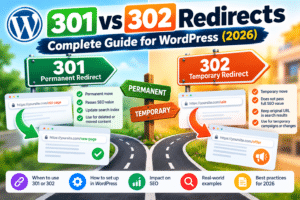
When you change URLsβwhether migrating to HTTPS, changing domain names, or restructuring permalinksβ301 redirects are essential. A 301 redirect tells search engines that a page has permanently moved to a new location, transferring approximately 90-99% of the original page’s ranking power.
When to use 301 redirects:Domain migration: Moving from oldsite.com to newsite.com
HTTPS migration: Switching from HTTP to secure HTTPS protocol
URL structure changes: Updating WordPress permalink structures
Content consolidation: Merging duplicate or thin content pages
WWW preferences: Enforcing www or non-www consistently across your siteServer-specific formats: Apache servers use .htaccess files with `Redirect 301` directives, while Nginx uses `rewrite` rules. Our builder generates production-ready code for both server types.
Technical SEO tools often come bundled in expensive suites ($99-$299/month), but our free alternatives provide the same core functionality:No cost: Save hundreds of dollars annually
No signup: Instant access without email registration
Privacy-focused: All processing happens in your browser
WordPress-optimized: Presets designed specifically for WordPress sites
Production-ready: Generate code you can deploy immediately
How to Use These Technical SEO Optimization Tools
Add any custom rules for specific crawlers
Click “Generate robots.txt”
Download or copy the generated code
Upload to your site’s root directory via FTP or file managerFor Redirect Rules Builder:Prepare a list of old URLs and their new destinations
Enter each pair on a separate line (old-path new-path)
Choose your server type (Apache .htaccess or Nginx)
Select redirect type (301 permanent or 302 temporary)
Click “Build Rules” and copy the generated code
Paste into your .htaccess file or nginx.conf
Technical SEO Best Practices
Never block CSS, JS, or image files needed for rendering
Use specific paths (e.g., `/wp-admin/`) not broad patterns
Include sitemap declaration at the bottom of the file
Review and update quarterly as your site evolves
Test redirects before deploying to production
Update internal links to point directly to new URLs
Monitor Google Search Console for crawl errors after migration
Avoid redirect chains (AβBβC); redirect directly (AβC)
Frequently Asked Questions
A robots.txt file is a text file in your website’s root directory that tells search engine bots which pages they can and cannot crawl. It’s part of the Robots Exclusion Protocol used by Google, Bing, and other search engines.
Upload robots.txt to your website’s root directory (e.g., public_html/robots.txt). You can access this via FTP, your hosting file manager, or WordPress SEO plugins like Yoast or Rank Math.
A 301 redirect indicates a permanent move and transfers ~90-99% of SEO value. A 302 redirect is temporary and doesn’t transfer ranking power. For permanent URL changes, always use 301.
No. Use only the format that matches your server. Most WordPress sites run on Apache (use .htaccess), while high-traffic sites may use Nginx. Check with your hosting provider if unsure.
Absolutely! These tools are free for personal, client, or agency use. We only ask that you don’t resell or redistribute the tools themselves.
Yes! These are standalone web tools that work independently of your hosting. The generated code is compatible with all standard Apache and Nginx servers (Hostinger, SiteGround, Bluehost, Cloudways, etc.).
Related Resources
Technical SEO Optimization Tools
{
“@context”: “https://schema.org”,
“@type”: “CollectionPage”,
“name”: “Technical SEO Optimization Tools for WordPress”,
“description”: “Free technical SEO Optimization tools: create robots.txt files with AI validation, generate .htaccess and nginx redirect rules, and manage crawler access.”
}