
Want to rank your WordPress site higher in Google? SEO can feel overwhelming, but with the right checklist, you can systematically optimize every aspect of your site. In this complete 2026 guide, you’ll get a proven 15-step WordPress SEO checklist that covers everything from on-page optimization to technical SEO. Plus, discover our free SEO optimization tools to speed up your optimization workflow.
📋 What You’ll Learn:
- Complete 15-step WordPress SEO checklist
- On-page SEO optimization (Steps 1-5)
- Technical SEO checklist (Steps 6-10)
- Off-page SEO and content strategy (Steps 11-15)
- Free SEO tools to speed up optimization
- Downloadable SEO checklist PDF
- Common WordPress SEO mistakes to avoid
Why You Need a WordPress SEO Checklist
SEO involves dozens of optimization tasks. Without a checklist, it’s easy to miss critical steps that could make or break your rankings. This checklist ensures you:
✅ Benefits of Using This Checklist:
- Systematic approach: Optimize every aspect of your site without missing anything
- Time-saving: Know exactly what to do next (no guesswork)
- Proven results: Based on 2026 SEO best practices and Google ranking factors
- Beginner-friendly: Step-by-step instructions anyone can follow
- Comprehensive: Covers on-page, technical, and off-page SEO
- Measurable: Track your progress and see improvements
⚠️ 2026 SEO Statistics:
- 75% of users never scroll past the first page of Google
- 68% of online experiences begin with a search engine
- 1st position in Google gets 31.7% of all clicks
- SEO leads have 14.6% close rate (vs. 1.7% for outbound leads)
- Organic search drives 53% of all website traffic
Complete WordPress SEO Checklist: 15 Steps
Follow these 15 steps in order to optimize your WordPress site for search engines:
📊 SEO Checklist Overview:
On-Page SEO (Steps 1-5):
- Keyword Research & Strategy
- Optimize Title Tags & Meta Descriptions
- URL Structure & Permalinks
- Content Optimization
- Image Optimization
Technical SEO (Steps 6-10):
- Site Speed Optimization
- Mobile-Friendliness
- SSL Certificate (HTTPS)
- XML Sitemap & Robots.txt
- Schema Markup
Off-Page SEO & Content (Steps 11-15):
- Internal Linking Strategy
- Build Quality Backlinks
- Content Marketing Strategy
- Local SEO Optimization
- Monitor & Analyze Performance
On-Page SEO Checklist (Steps 1-5)
Step 1: Keyword Research & Strategy
Keyword research is the foundation of SEO. You need to know what your audience is searching for before creating content.
✅ Action Items:
- Identify 5-10 primary keywords for your niche
- Find 20-30 long-tail keywords (easier to rank)
- Analyze search intent (informational, commercial, transactional)
- Check keyword difficulty (aim for KD under 40 for new sites)
- Create a keyword map (which keywords for which pages)
🛠️ Tools to Use:
- Google Keyword Planner (free)
- Ahrefs Keyword Generator (free)
- Ubersuggest (freemium)
- AnswerThePublic (free)
- SEMrush or Ahrefs (paid, recommended)
Step 2: Optimize Title Tags & Meta Descriptions
Title tags and meta descriptions are critical for click-through rates (CTR) from search results.
✅ Action Items:
- Include primary keyword in title (first 3-5 words)
- Keep titles under 60 characters (580 pixels)
- Write compelling meta descriptions (150-160 characters)
- Include keyword in meta description (Google bolds it)
- Add power words: “Complete”, “Ultimate”, “Proven”, “2026”
- Use our free SERP Preview tool to preview titles
🛠️ Tools to Use:
- SERP Preview Tool (free)
- Meta Length Checker (free)
- Yoast SEO or Rank Math (WordPress plugins)
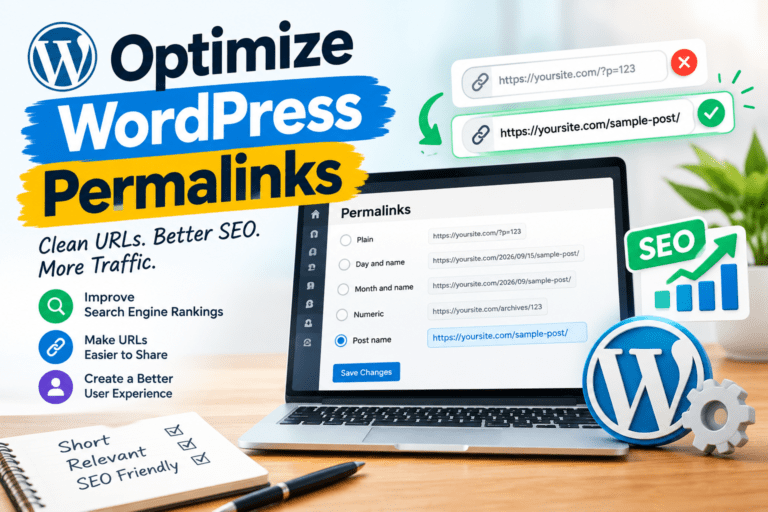
Step 3: URL Structure & Permalinks
Clean, keyword-rich URLs help Google understand your content and improve click-through rates.
✅ Action Items:
- Set permalink structure to “Post name” in WordPress
- Include target keyword in every URL slug
- Keep URLs short (3-5 words, under 60 characters)
- Use hyphens to separate words (not underscores)
- Use lowercase letters only
- Use our free Slug Generator tool for perfect URLs
🛠️ Tools to Use:
- Slug Generator Tool (free)
- WordPress Settings → Permalinks
Step 4: Content Optimization
High-quality, optimized content is the #1 ranking factor. Google rewards comprehensive, valuable content.
✅ Action Items:
- Write comprehensive content (1,000-2,000 words for blog posts)
- Include primary keyword in first 100 words
- Use keywords naturally throughout content (1-2% density)
- Add LSI keywords (related terms and synonyms)
- Use proper heading hierarchy (H1, H2, H3)
- Include keywords in H2 and H3 subheadings
- Add internal links to related content (3-5 links per post)
- Include external links to authoritative sources
- Use our Word Count tool to analyze content length
🛠️ Tools to Use:
- Word Count & Reading Time Tool (free)
- Grammarly (for grammar and readability)
- Hemingway App (for readability)
- Surfer SEO or Clearscope (for content optimization)
Step 5: Image Optimization
Optimized images improve page speed and provide additional ranking opportunities through Google Image Search.
✅ Action Items:
- Compress images before uploading (use TinyPNG or ShortPixel)
- Use WebP format (25-35% smaller than JPEG)
- Add descriptive alt text with keywords (where relevant)
- Use descriptive file names (e.g.,
wordpress-seo-checklist.jpg) - Enable lazy loading for images
- Resize images to display dimensions (don’t upload 4000px images)
- Add image titles and captions (optional but helpful)
🛠️ Tools to Use:
- TinyPNG (free image compression)
- ShortPixel or Smush (WordPress plugins)
- Convertio (convert to WebP format)
Technical SEO Checklist (Steps 6-10)
Step 6: Site Speed Optimization
Page speed is a confirmed Google ranking factor. Slow sites rank lower and have higher bounce rates.
✅ Action Items:
- Install caching plugin (WP Rocket or W3 Total Cache)
- Enable GZIP or Brotli compression
- Minify CSS, JavaScript, and HTML
- Use a CDN (Cloudflare free plan)
- Optimize images (compress, WebP format)
- Choose fast hosting (avoid cheap shared hosting)
- Aim for PageSpeed score of 90+
- Target load time under 3 seconds
🛠️ Tools to Use:
- Google PageSpeed Insights (free)
- GTmetrix (free)
- WP Rocket (premium caching plugin)
- Cloudflare (free CDN)
Related: Read our complete WordPress Speed Optimization Guide for detailed instructions.
Step 7: Mobile-Friendliness
Google uses mobile-first indexing, meaning it primarily uses the mobile version of your site for ranking.
✅ Action Items:
- Use a responsive WordPress theme
- Test mobile-friendliness with Google’s tool
- Ensure text is readable without zooming
- Make buttons and links easy to tap (minimum 44×44 pixels)
- Avoid horizontal scrolling
- Optimize images for mobile (smaller file sizes)
- Test on multiple devices (phone, tablet)
🛠️ Tools to Use:
- Google Mobile-Friendly Test (free)
- Browser DevTools (responsive design mode)
- Responsive theme (GeneratePress, Astra, Kadence)
Step 8: SSL Certificate (HTTPS)
HTTPS is a ranking signal and essential for user trust. Sites without SSL show “Not Secure” warnings in browsers.
✅ Action Items:
- Install SSL certificate (most hosting provides free Let’s Encrypt)
- Force HTTPS redirect (all HTTP → HTTPS)
- Update WordPress URL settings to HTTPS
- Fix mixed content warnings (HTTP resources on HTTPS pages)
- Update internal links to use HTTPS
- Verify SSL with SSL Labs test
🛠️ Tools to Use:
- Let’s Encrypt (free SSL)
- Really Simple SSL (WordPress plugin)
- SSL Labs (SSL test)
Step 9: XML Sitemap & Robots.txt
XML sitemaps help Google discover and index your pages. Robots.txt tells search engines which pages to crawl or avoid.
✅ Action Items:
- Generate XML sitemap (Yoast SEO or Rank Math does this automatically)
- Submit sitemap to Google Search Console
- Create robots.txt file (use our Robots.txt Generator)
- Block admin areas (/wp-admin/, /wp-includes/)
- Allow important pages to be crawled
- Add sitemap declaration to robots.txt
- Test robots.txt in Google Search Console
🛠️ Tools to Use:
- Robots.txt Generator Tool (free)
- Yoast SEO or Rank Math (automatic sitemap)
- Google Search Console (submit sitemap)
Step 10: Schema Markup
Schema markup (structured data) helps Google understand your content and can earn you rich snippets in search results.
✅ Action Items:
- Add Article schema for blog posts
- Add FAQ schema for FAQ pages
- Add HowTo schema for tutorials
- Add LocalBusiness schema for local businesses
- Add Product schema for e-commerce
- Add Review schema for reviews
- Test schema with Google’s Rich Results Test
🛠️ Tools to Use:
- Rank Math or Yoast SEO (built-in schema)
- Schema Pro (premium WordPress plugin)
- Google Rich Results Test (free)
- Schema.org (schema reference)
Off-Page SEO & Content Checklist (Steps 11-15)
Step 11: Internal Linking Strategy
Internal links help Google discover and index your content, distribute link equity, and improve user navigation.
✅ Action Items:
- Link to 3-5 related posts in every article
- Use descriptive anchor text (not “click here”)
- Link to pillar pages and category pages
- Update old posts with links to new content
- Create topic clusters with internal links
- Use breadcrumb navigation
- Add related posts section at bottom of articles
Step 12: Build Quality Backlinks
Backlinks are one of the top 3 ranking factors. Quality matters more than quantity.
✅ Action Items:
- Create linkable content (guides, studies, infographics)
- Guest post on authoritative blogs in your niche
- Reach out to sites linking to competitors (use Ahrefs)
- Build relationships with bloggers and influencers
- Submit to relevant directories and resource pages
- Create original research or case studies
- Use HARO (Help a Reporter Out) for media mentions
- Avoid buying links or link schemes (Google penalty risk)
🛠️ Tools to Use:
- Ahrefs or SEMrush (backlink analysis)
- HARO (media mentions)
- BuzzStream or Pitchbox (outreach)
Step 13: Content Marketing Strategy
Consistent, high-quality content is essential for long-term SEO success.
✅ Action Items:
- Publish 2-4 high-quality posts per week
- Create a content calendar
- Focus on evergreen content (long-term value)
- Update old content regularly (keep it fresh)
- Repurpose content into different formats (videos, infographics, podcasts)
- Promote content on social media
- Build an email list to promote new content
Step 14: Local SEO Optimization
If you serve local customers, local SEO is critical for appearing in “near me” searches.
✅ Action Items:
- Create and optimize Google Business Profile
- Add NAP (Name, Address, Phone) to website footer
- Create location-specific landing pages
- Get reviews on Google, Yelp, and industry sites
- Add LocalBusiness schema markup
- Build local citations (directories, chambers of commerce)
- Target local keywords (e.g., “WordPress developer in [city]”)
🛠️ Tools to Use:
- Google Business Profile (free)
- BrightLocal or Whitespark (local SEO tools)
- Moz Local (citation management)
Step 15: Monitor & Analyze Performance
SEO is ongoing. You need to track your progress and adjust your strategy based on data.
✅ Action Items:
- Install Google Analytics 4 (GA4)
- Set up Google Search Console
- Track keyword rankings weekly
- Monitor organic traffic trends
- Check for crawl errors in Search Console
- Analyze top-performing content
- Track backlinks and referring domains
- Review Core Web Vitals monthly
- Adjust strategy based on data
🛠️ Tools to Use:
- Google Analytics 4 (free)
- Google Search Console (free)
- Ahrefs or SEMrush (rank tracking)
- Google PageSpeed Insights (free)
Downloadable WordPress SEO Checklist (PDF)
📥 Explore Your Free SEO Checklist
Download our complete WordPress SEO checklist as a PDF. Print it out and check off each step as you optimize your site!
What’s Included:
- ✅ Complete 15-step SEO checklist
- ✅ On-page, technical, and off-page SEO
- ✅ Tools and resources for each step
- ✅ Printable PDF format
Common WordPress SEO Mistakes to Avoid
❌ Mistake #1: Not Setting Up Google Search Console
Search Console is free and provides critical data about your site’s performance in Google. Set it up immediately!
❌ Mistake #2: Ignoring Mobile Optimization
Google uses mobile-first indexing. If your site isn’t mobile-friendly, you won’t rank well.
❌ Mistake #3: Keyword Stuffing
Don’t force keywords unnaturally. Write for humans first, search engines second. Keyword density should be 1-2% maximum.
❌ Mistake #4: Not Optimizing Images
Large, unoptimized images slow down your site and hurt rankings. Always compress and optimize images before uploading.
❌ Mistake #5: Ignoring Site Speed
Slow sites rank lower and have higher bounce rates. Aim for PageSpeed scores of 90+ and load times under 3 seconds.
Conclusion
SEO is not a one-time task—it’s an ongoing process. By following this 15-step WordPress SEO checklist, you’ll systematically optimize every aspect of your site and improve your chances of ranking higher in Google.
Key Takeaways:
- ✅ Follow all 15 steps in order for best results
- ✅ Use the recommended tools to speed up optimization
- ✅ Download the SEO checklist PDF for easy reference
- ✅ Focus on quality over quantity (content, backlinks)
- ✅ Monitor performance regularly and adjust strategy
- ✅ SEO takes time—be patient and consistent
Ready to optimize your WordPress site for SEO? Start with Step 1 (Keyword Research) and work your way through the checklist. Use our free SEO optimization tools to speed up your optimization workflow!
🚀 Related SEO Resources:
Want to learn more about WordPress SEO? Check out these comprehensive guides:
Enjoy this post?