
INTRODUCTION
Welcome to the Complete WordPress SEO Checklist!
This checklist contains 15 proven steps to optimize your WordPress site for search engines
and rank higher in Google.
HOW TO USE THIS CHECKLIST:
✓ Print this PDF or use it digitally
✓ Check off each item as you complete it
✓ Follow steps in order for best results
✓ Use recommended tools to speed up optimization
✓ Check off each item as you complete it
✓ Follow steps in order for best results
✓ Use recommended tools to speed up optimization
Let’s get started!
ON-PAGE SEO — Steps 1-5
STEP 1: KEYWORD RESEARCH & STRATEGY
☐ Identify 5-10 primary keywords for your niche
☐ Find 20-30 long-tail keywords
☐ Analyze search intent
☐ Check keyword difficulty (aim for KD < 40)
☐ Create keyword map
☐ Find 20-30 long-tail keywords
☐ Analyze search intent
☐ Check keyword difficulty (aim for KD < 40)
☐ Create keyword map
TOOLS:
• Google Keyword Planner
• Ahrefs Keyword Generator
• AnswerThePublic
• Ubersuggest
STEP 2: OPTIMIZE TITLE TAGS & META DESCRIPTIONS
☐ Include primary keyword in title (first 3-5 words)
☐ Keep titles under 60 characters
☐ Write compelling meta descriptions (150-160 characters)
☐ Include keyword in meta description
☐ Add power words: “Complete”, “Ultimate”, “Proven”, “2026”
☐ Preview with SERP Preview tool
☐ Keep titles under 60 characters
☐ Write compelling meta descriptions (150-160 characters)
☐ Include keyword in meta description
☐ Add power words: “Complete”, “Ultimate”, “Proven”, “2026”
☐ Preview with SERP Preview tool
TOOLS:
• SERP Preview Tool (FREE)
• Meta Length Checker (FREE)
• Yoast SEO or Rank Math
STEP 3: URL STRUCTURE & PERMALINKS
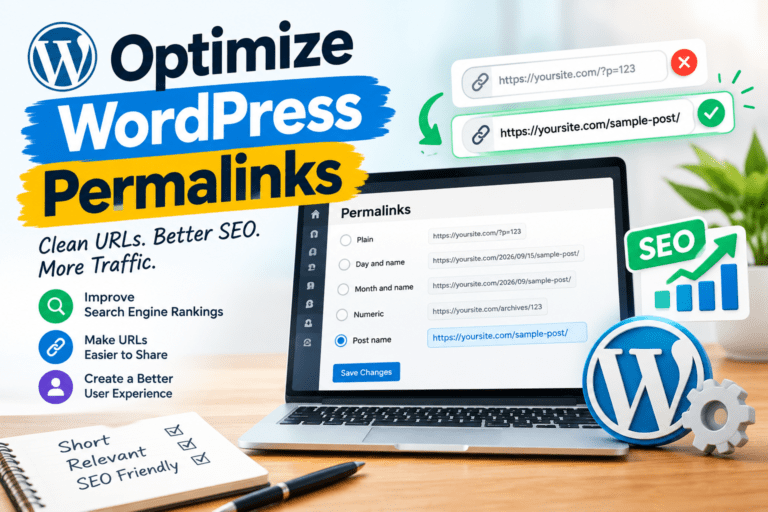
☐ Set permalink structure to “Post name”
☐ Include target keyword in every URL slug
☐ Keep URLs short (3-5 words, under 60 chars)
☐ Use hyphens to separate words
☐ Use lowercase letters only
☐ Remove stop words (a, the, and, of)
☐ Include target keyword in every URL slug
☐ Keep URLs short (3-5 words, under 60 chars)
☐ Use hyphens to separate words
☐ Use lowercase letters only
☐ Remove stop words (a, the, and, of)
TOOLS:
• Slug Generator Tool (FREE)
• WordPress Settings → Permalinks
STEP 4: CONTENT OPTIMIZATION
☐ Write comprehensive content (1,000-2,000 words for blog posts)
☐ Include primary keyword in first 100 words
☐ Use keywords naturally throughout (1-2% density)
☐ Add LSI keywords (related terms)
☐ Use proper heading hierarchy (H1, H2, H3)
☐ Include keywords in H2 and H3 subheadings
☐ Add internal links (3-5 per post)
☐ Include external links to authoritative sources
☐ Include primary keyword in first 100 words
☐ Use keywords naturally throughout (1-2% density)
☐ Add LSI keywords (related terms)
☐ Use proper heading hierarchy (H1, H2, H3)
☐ Include keywords in H2 and H3 subheadings
☐ Add internal links (3-5 per post)
☐ Include external links to authoritative sources
TOOLS:
• Word Count & Reading Time Tool (FREE)
• Grammarly
• Hemingway App
STEP 5: IMAGE OPTIMIZATION
☐ Compress images before uploading
☐ Use WebP format (25-35% smaller)
☐ Add descriptive alt text with keywords
☐ Use descriptive file names
☐ Enable lazy loading
☐ Resize images to display dimensions
☐ Add image titles and captions
☐ Use WebP format (25-35% smaller)
☐ Add descriptive alt text with keywords
☐ Use descriptive file names
☐ Enable lazy loading
☐ Resize images to display dimensions
☐ Add image titles and captions
TOOLS:
• TinyPNG (free compression)
• ShortPixel or Smush (WordPress plugin)
• Convertio (convert to WebP)
TECHNICAL SEO — Steps 6-10
STEP 6: SITE SPEED OPTIMIZATION
☐ Install caching plugin (WP Rocket or W3 Total Cache)
☐ Enable GZIP or Brotli compression
☐ Minify CSS, JavaScript, and HTML
☐ Use a CDN (Cloudflare free plan)
☐ Optimize images (compress, WebP format)
☐ Choose fast hosting
☐ Aim for PageSpeed score of 90+
☐ Target load time under 3 seconds
☐ Enable GZIP or Brotli compression
☐ Minify CSS, JavaScript, and HTML
☐ Use a CDN (Cloudflare free plan)
☐ Optimize images (compress, WebP format)
☐ Choose fast hosting
☐ Aim for PageSpeed score of 90+
☐ Target load time under 3 seconds
TOOLS:
• Google PageSpeed Insights
• GTmetrix
• WP Rocket
• Cloudflare
STEP 7: MOBILE-FRIENDLINESS
☐ Use a responsive WordPress theme
☐ Test mobile-friendliness
☐ Ensure text is readable without zooming
☐ Make buttons easy to tap (min 44×44 pixels)
☐ Avoid horizontal scrolling
☐ Optimize images for mobile
☐ Test on multiple devices
☐ Test mobile-friendliness
☐ Ensure text is readable without zooming
☐ Make buttons easy to tap (min 44×44 pixels)
☐ Avoid horizontal scrolling
☐ Optimize images for mobile
☐ Test on multiple devices
TOOLS:
• Google Mobile-Friendly Test
• Browser DevTools
• Responsive theme (GeneratePress, Astra)
STEP 8: SSL CERTIFICATE (HTTPS)
☐ Install SSL certificate (Let’s Encrypt free)
☐ Force HTTPS redirect
☐ Update WordPress URL settings to HTTPS
☐ Fix mixed content warnings
☐ Update internal links to HTTPS
☐ Verify SSL with SSL Labs test
☐ Force HTTPS redirect
☐ Update WordPress URL settings to HTTPS
☐ Fix mixed content warnings
☐ Update internal links to HTTPS
☐ Verify SSL with SSL Labs test
TOOLS:
• Let’s Encrypt
• Really Simple SSL plugin
• SSL Labs
STEP 9: XML SITEMAP & ROBOTS.TXT
☐ Generate XML sitemap
☐ Submit sitemap to Google Search Console
☐ Create robots.txt file
☐ Block admin areas (/wp-admin/, /wp-includes/)
☐ Allow important pages to be crawled
☐ Add sitemap declaration to robots.txt
☐ Test robots.txt in Google Search Console
☐ Submit sitemap to Google Search Console
☐ Create robots.txt file
☐ Block admin areas (/wp-admin/, /wp-includes/)
☐ Allow important pages to be crawled
☐ Add sitemap declaration to robots.txt
☐ Test robots.txt in Google Search Console
TOOLS:
• Robots.txt Generator Tool (FREE)
• Yoast SEO or Rank Math (sitemap)
• Google Search Console
STEP 10: SCHEMA MARKUP
☐ Add Article schema for blog posts
☐ Add FAQ schema for FAQ pages
☐ Add HowTo schema for tutorials
☐ Add LocalBusiness schema for local businesses
☐ Add Product schema for e-commerce
☐ Add Review schema for reviews
☐ Test schema with Rich Results Test
☐ Add FAQ schema for FAQ pages
☐ Add HowTo schema for tutorials
☐ Add LocalBusiness schema for local businesses
☐ Add Product schema for e-commerce
☐ Add Review schema for reviews
☐ Test schema with Rich Results Test
TOOLS:
• Rank Math or Yoast SEO
• Schema Pro
• Google Rich Results Test
OFF-PAGE SEO & CONTENT — Steps 11-15
STEP 11: INTERNAL LINKING STRATEGY
☐ Link to 3-5 related posts in every article
☐ Use descriptive anchor text (not “click here”)
☐ Link to pillar pages and category pages
☐ Update old posts with links to new content
☐ Create topic clusters with internal links
☐ Use breadcrumb navigation
☐ Add related posts section at bottom
☐ Use descriptive anchor text (not “click here”)
☐ Link to pillar pages and category pages
☐ Update old posts with links to new content
☐ Create topic clusters with internal links
☐ Use breadcrumb navigation
☐ Add related posts section at bottom
STEP 12: BUILD QUALITY BACKLINKS
☐ Create linkable content (guides, studies)
☐ Guest post on authoritative blogs
☐ Reach out to sites linking to competitors
☐ Build relationships with bloggers
☐ Submit to relevant directories
☐ Create original research or case studies
☐ Use HARO for media mentions
☐ Avoid buying links (penalty risk)
☐ Guest post on authoritative blogs
☐ Reach out to sites linking to competitors
☐ Build relationships with bloggers
☐ Submit to relevant directories
☐ Create original research or case studies
☐ Use HARO for media mentions
☐ Avoid buying links (penalty risk)
TOOLS:
• Ahrefs or SEMrush
• HARO (Help a Reporter Out)
• BuzzStream or Pitchbox
STEP 13: CONTENT MARKETING STRATEGY
☐ Publish 2-4 high-quality posts per week
☐ Create a content calendar
☐ Focus on evergreen content
☐ Update old content regularly
☐ Repurpose content (videos, infographics)
☐ Promote content on social media
☐ Build an email list
☐ Create a content calendar
☐ Focus on evergreen content
☐ Update old content regularly
☐ Repurpose content (videos, infographics)
☐ Promote content on social media
☐ Build an email list
STEP 14: LOCAL SEO OPTIMIZATION
☐ Create and optimize Google Business Profile
☐ Add NAP (Name, Address, Phone) to footer
☐ Create location-specific landing pages
☐ Get reviews on Google, Yelp, etc.
☐ Add LocalBusiness schema markup
☐ Build local citations
☐ Target local keywords
☐ Add NAP (Name, Address, Phone) to footer
☐ Create location-specific landing pages
☐ Get reviews on Google, Yelp, etc.
☐ Add LocalBusiness schema markup
☐ Build local citations
☐ Target local keywords
TOOLS:
• Google Business Profile
• BrightLocal or Whitespark
• Moz Local
STEP 15: MONITOR & ANALYZE PERFORMANCE
☐ Install Google Analytics 4 (GA4)
☐ Set up Google Search Console
☐ Track keyword rankings weekly
☐ Monitor organic traffic trends
☐ Check for crawl errors
☐ Analyze top-performing content
☐ Track backlinks and referring domains
☐ Review Core Web Vitals monthly
☐ Adjust strategy based on data
☐ Set up Google Search Console
☐ Track keyword rankings weekly
☐ Monitor organic traffic trends
☐ Check for crawl errors
☐ Analyze top-performing content
☐ Track backlinks and referring domains
☐ Review Core Web Vitals monthly
☐ Adjust strategy based on data
TOOLS:
• Google Analytics 4
• Google Search Console
• Ahrefs or SEMrush
• Google PageSpeed Insights
BONUS RESOURCES
FREE SEO TOOLS:
✓ Slug Generator Tool — Create SEO-friendly URLs instantly
✓ SERP Preview Tool — Preview titles and meta descriptions
✓ Meta Length Checker — Validate title and description lengths
✓ Word Count & Reading Time — Analyze content length
✓ Robots.txt Generator — Create robots.txt files
RECOMMENDED PLUGINS:
✓ Yoast SEO or Rank Math (SEO optimization)
✓ WP Rocket (caching and speed)
✓ Smush or ShortPixel (image optimization)
✓ Really Simple SSL (SSL certificate)
✓ UpdraftPlus (backups)
✓ WP Rocket (caching and speed)
✓ Smush or ShortPixel (image optimization)
✓ Really Simple SSL (SSL certificate)
✓ UpdraftPlus (backups)
RECOMMENDED SERVICES:
✓ Cloudflare (free CDN)
✓ Google Search Console (free)
✓ Google Analytics 4 (free)
✓ Ahrefs or SEMrush (keyword research)
✓ Kinsta or SiteGround (hosting)
✓ Google Search Console (free)
✓ Google Analytics 4 (free)
✓ Ahrefs or SEMrush (keyword research)
✓ Kinsta or SiteGround (hosting)
THANK YOU FOR DOWNLOADING!
Ready to optimize your WordPress site?
Start with Step 1 and work your way through the checklist.
Need help?
Visit: wprole.com
Email: contact@wprole.com
MORE FREE RESOURCES:
- WordPress Speed Optimization Guide
- On-Page SEO Complete Guide
- Content Marketing Strategy
- Technical SEO Checklist
Visit wprole.com for more guides!
Enjoy this post?

© 2026 wprole.com
All rights reserved.
[…] 📥 SEO Checklist […]